The Sims 4 July 2026 Update: Autosave Is Finally Here, but There’s a Catch
The Sims 4 has finally added autosave. Yes, finally. After nearly 12 years of players losing entire houses, weddings, babies, promotions, and suspiciously elaborate basement projects to random crashes, the game can now save our progress without being personally begged.
The free Sims 4 July 2026 update was released on July 21 for PC, Mac, PlayStation, and Xbox. Along with the new autosave system, it adds customizable save reminders, brings Memory Boost to every platform, introduces eight new Create-a-Sim starter Sims, and fixes several highly reported bugs.
Autosave is easily the biggest addition, but before you trust it with your 14-generation legacy family, there are a few catches you need to know about.
The Sims 4 July 2026 Update at a Glance
The latest Sims 4 base game update includes:
Autosave on PC, Mac, PlayStation, and Xbox.
Customizable save reminders.
Memory Boost enabled across every platform.
Eight new Create-a-Sim starter Sims.
Eight free culturally inspired accessories.
Fewer unwanted Businesses & Hobbies notifications.
A toggle for Nordhaven Hobby Meetup notifications.
Three additional swatches for the City Living YumCooker stove.
Fixes for disappearing roofs, crashes, and corrupted Residential Rental lots.
The patch versions are 1.126.58.1030 for PC, 1.126.58.1230 for Mac, and 2.36 for consoles.
How Autosave Works in The Sims 4

The new Sims 4 autosave system quietly creates save points while you play. You can choose when the game automatically saves through the new Save Settings menu.
Autosaves can be triggered:
After traveling between lots.
After a selected amount of real-world playtime.
At specific gameplay milestones.
When leaving Build Mode.
That last option is especially important for builders. Spending three hours placing individual kitchen clutter items only for the game to crash is a very specific type of grief. Nobody should have to rebuild the decorative fruit bowl that finally looked natural.
The game displays an “Autosaving” message when the feature activates, so you will know when your progress is being recorded.
Even better, autosave creates a separate save slot. According to information shared during the July developer Q&A, it does not replace your normal manual save. Your carefully managed legacy file is not being tossed into a mystery blender every time your Sim travels to the gym.
So, What Is the Catch?
Autosave is helpful, but it is not a complete replacement for saving manually.
The feature creates one separate autosave slot based on the triggers you select. That means it may not capture every important moment immediately. If your game crashes before reaching the next timed autosave, travel screen, milestone, or other chosen trigger, you could still lose some progress.
There is also a platform limitation:
PC and Mac players can disable autosave completely.
Console players can adjust its frequency, but cannot turn it off.
Autosave should therefore be treated as a safety net, not an excuse to retire the Save button. Continue using Save As for important backup copies, especially before major household changes, moving lots, installing packs, or updating mods.
Think of autosave as a friend holding the ladder. Very useful, deeply appreciated, but you should still avoid doing anything reckless on the roof.
Save Reminders Are Also Included
Players who prefer manual control can enable Save Reminders. At a selected interval, a tiny gnome appears and reminds you to save your game.
The reminders are customizable and can be disabled if you do not want another character entering your life exclusively to criticize your choices. We already have neighborhood stories for that.
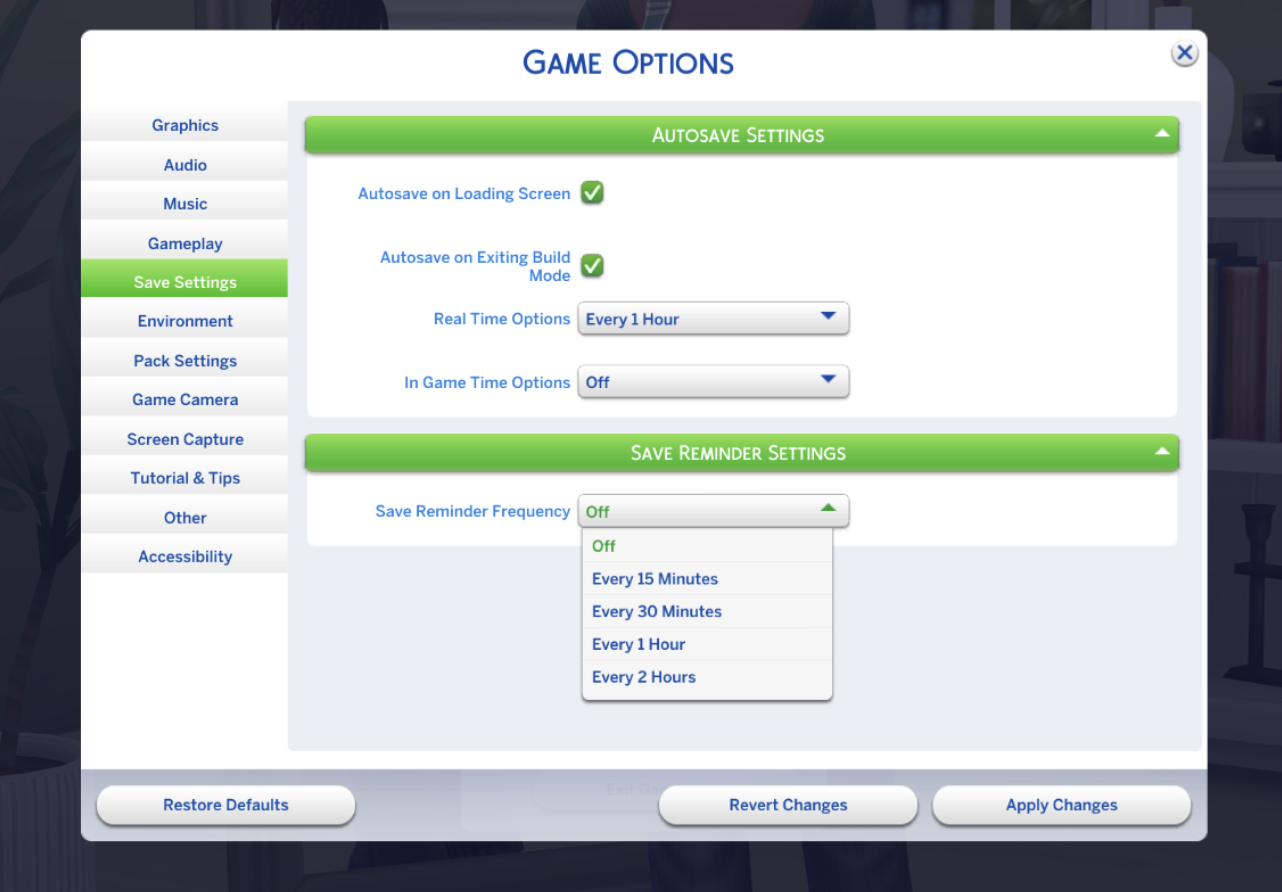
Unlike autosave, using the reminder saves over your most recently played slot, just like selecting “Save” manually.
For maximum protection, I would use both:
Set autosave to activate after traveling and at timed intervals.
Enable manual reminders every 30 to 60 minutes.
Use Save As before making major changes .
Keep an external backup of important save files.
It sounds excessive until a crash wipes out an entire renovated mansion and leaves you staring at an empty lot like the insurance company denied your claim.
Festival Notification Settings Have Been Expanded
The July 21 Sims 4 update also gives players more control over festival and event notifications. The Festival Notifications menu was originally introduced in the June 30 update, allowing players to disable festival alerts individually instead of being notified about every event happening across the game.
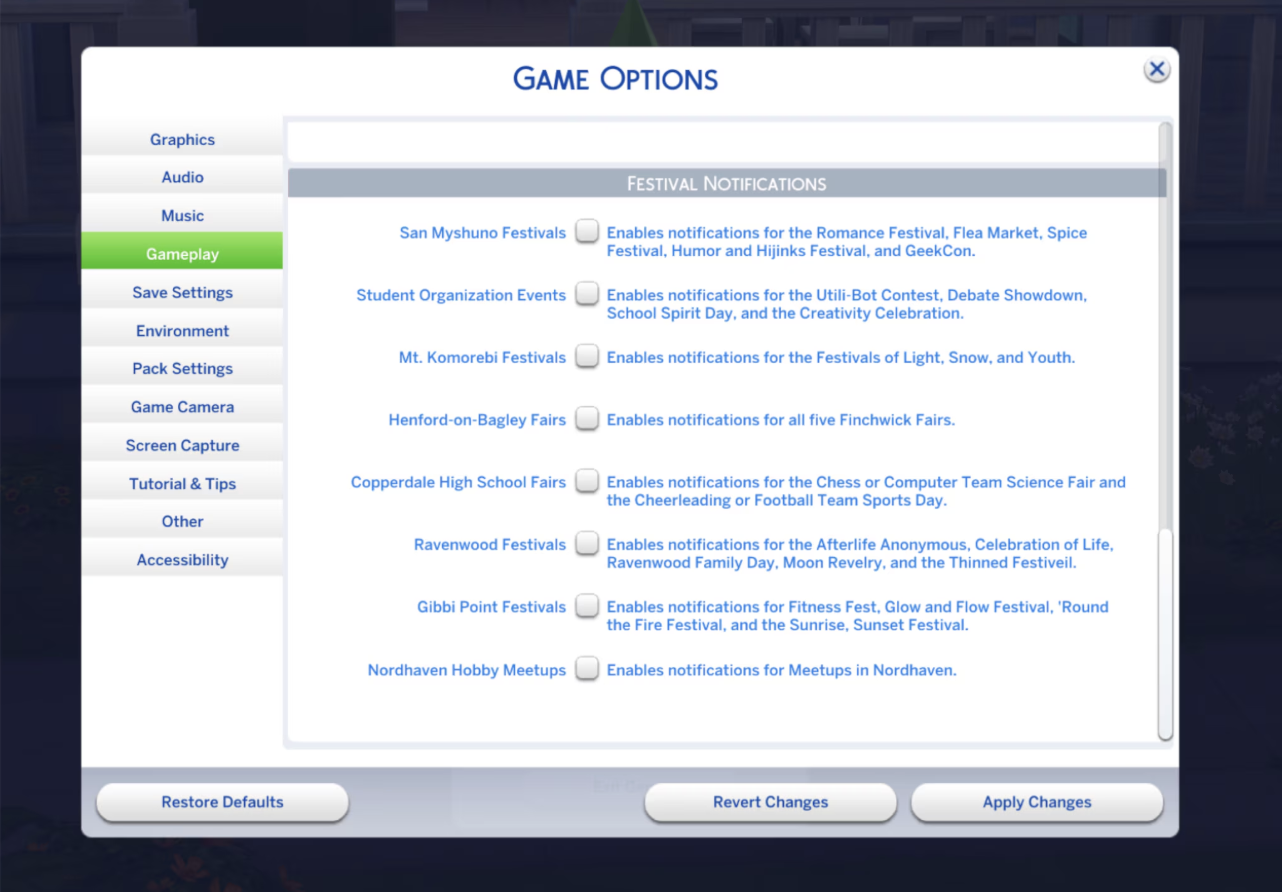
This update adds Nordhaven Hobby Meetups to the menu, so players with Businesses & Hobbies can now switch those alerts off. EA has also removed the “Sugary Cravings” notification and other repetitive pop-ups from the expansion.
It is a smaller change than autosave, but a welcome one for anyone whose notification wall has started looking like a community bulletin board nobody asked to join.
Memory Boost Is Now Mandatory
The July 2026 update also enables Memory Boost on PC, Mac, PlayStation, and Xbox. Memory Boost changes how The Sims 4 manages memory during gameplay. EA says it can provide:
Reduced lag.
Better frame rates and responsiveness.
Shorter loading times.
Fewer memory-related crashes.
Better stability in large or older saves.
Players with long-running legacy saves, large households, heavily decorated lots, or lengthy play sessions may notice the biggest difference.
However, Memory Boost is now automatically enabled and cannot be switched off. The previous Memory Boost option has been removed from the settings menu.
EA says its testing found that Memory Boost helped with corrupted lots in saves containing many Residential Rentals. However, the developers also stressed that it is not a magical save-repair button. It may help open certain damaged saves and reduce some forms of corruption, but it cannot fix every possible save problem.
In other words, Memory Boost is promising, but please do not hand it your oldest legacy save without making a backup first.
New Create-a-Sim Content
The Sims 4 July 2026 update adds eight new starter Sims to Create-a-Sim. These are the premade Sims who sometimes appear when beginning a new household or resetting the current household.

The new Sims showcase eight free accessories inspired by Caribbean, Indigenous, Latin American, and South Asian cultures. The collection includes:
Two pairs of earrings.
One necklace.
Five bracelets and watches.
Designs featuring cowrie shells, turquoise, bangles, and woven details.
These are relatively small additions, but free Create-a-Sim jewelry is always welcome. My accessory section has been surviving on the same handful of usable bracelets for approximately 400 Sim years.
Major Bug Fixes in the July Update
This is not an enormous bug-fix patch, but it addresses several noticeable problems.
The update fixes an issue that caused roof pieces or entire roof sections to disappear while viewing upper floors in Build Mode. The fix is retroactive, meaning roofs affected in existing saves should display correctly again.
EA also addressed:
Crashes caused by caching problems after several Sim hours.
A crash that could occur when interacting with household members.
Corrupted lots appearing in saves with numerous Residential Rentals.
Excessive Businesses & Hobbies notifications.
Missing swatches on the City Living version of the YumCooker stove.
There are still remaining visual UI issues connected to saves that previously contained mods, so this update does not fix everything. Shocking, I know. The Sims 4 has defeated one bug and approximately 700 others are waiting patiently in the lobby.
Should You Update…?
Yes, but mod users be cautious.
Autosave is one of the most useful quality-of-life features The Sims 4 has received in years. Memory Boost may also improve performance for players with older, larger, or more complicated saves. The roof and crash fixes make the update even more worthwhile.
Before updating, however:
Back up your Sims 4 save folder.
Remove your Mods folder temporarily.
Delete the localthumbcache.package file.
Check whether your major script mods have been updated.
Test the game without mods before loading an important save.
Even if every mod appears to work, use a copied save while testing. Opening a precious legacy file immediately after a major patch is the Sims equivalent of hearing a strange noise downstairs and deciding to investigate alone.
Final Thoughts
The Sims 4 July 2026 update finally gives players a proper, customizable autosave system, and it arrives about 12 years later than anyone would have preferred. Still, it is a genuinely helpful addition that could prevent hours of lost gameplay.
The catch is that autosave only protects the moments it actually records. Console players also cannot disable it, while Memory Boost is now permanently enabled across every platform.
Keep saving manually, continue making backups, and do not trust one autosave slot with the entire history of your digital bloodline. The feature is a safety net, not a legally binding promise that The Sims 4 will never ruin your evening again.
You can read the complete details in EA’s official July 21 patch notes.